
Enhance your mobile gaming experience
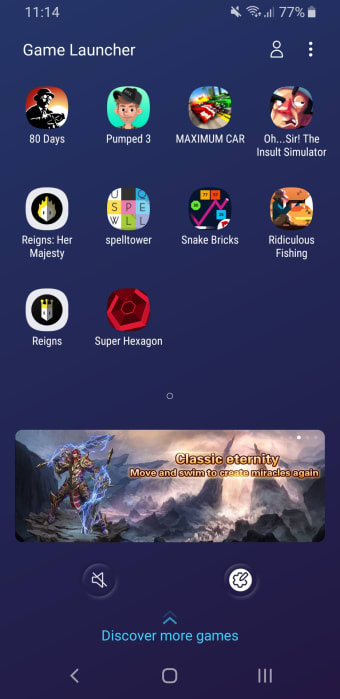
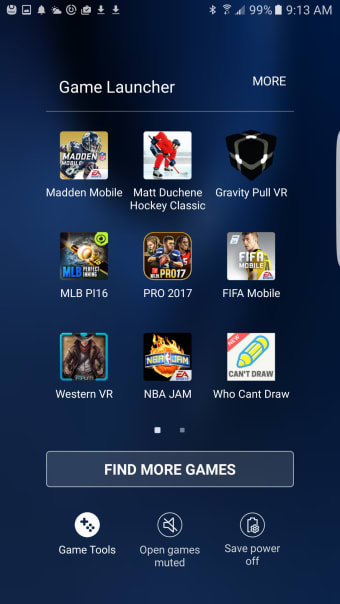
This application elevates the gaming experience on devices as it focuses on optimizing performance and providing essential tools that cater specifically to mobile gamers. With Samsung Game Launcher, downloaded games are quickly and easily organized in one place for easy access. Instead of enforcing a high-performance mode, this utility keeps a middle ground between optimal performance and battery use.
Top Recommended Alternative

Effortless integration for seamless gaming
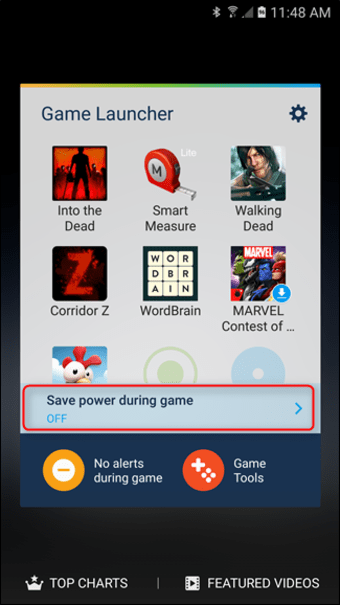
This application excels in balancing your device's capabilities with an improved gaming experience, from performance control to preventing distractions. Priority Mode enables the ability to block incoming calls and notifications during gameplay to prevent distractions.
Samsung Game Launcher is equipped with various options for performance tuning. Depending on their device specifications, users can adjust game resolutions and frame rates to enhance their gaming experience while managing battery life. This customization is beneficial for both competitive gamers looking for smooth gameplay and casual players wanting to conserve energy.
The built-in screen recorder and screenshot functionalities further enrich the experience. Users can easily capture gameplay highlights in high quality, customizing resolution and bitrate settings to their preference. These features help in documenting and sharing exciting moments effortlessly, adding a social aspect to the gameplay.
A user-centric approach to game optimization
While the user interface aims for simplicity, some users might encounter a slight learning curve when exploring the application’s diverse features. The interface is generally straightforward but lacks a dynamic aesthetic, which some gamers may find unappealing. Samsung Game Launcher adapts to user habits and device conditions by monitoring temperature, memory usage, and battery drain to adjust settings in order to maintain optimal performance.
Expanded performance controls and gaming modes
Recent updates to Samsung Game Launcher and Game Booster have introduced even more ways for players to customize their gaming sessions. Newer Galaxy devices now support advanced performance profiles, allowing users to prioritize battery life, balanced optimization, or maximum frame rate depending on the game being played. Samsung has also improved per-game customization settings, letting users adjust FPS limits, resolution, and touch response individually for different titles.
In addition, Samsung has been expanding the capabilities of Game Booster+, adding features such as gamepad touch mapping, performance tuning, and even faster game startup optimizations on supported Galaxy devices. These additions provide more flexibility for competitive players who want tighter controls and smoother responsiveness during demanding gaming sessions.
Smarter monitoring and real-time tools
Samsung has also enhanced the app’s real-time monitoring tools to help users better understand device performance while gaming. A newer system monitor overlay can now display live information such as FPS, CPU usage, GPU activity, and RAM consumption directly on the screen during gameplay. This feature gives users better visibility into how their device performs under pressure without needing third-party applications.
Additional gaming-focused features such as AI-powered mute controls, floating respawn timers, customizable notifications, and enhanced audio management have also started appearing in newer updates tied to One UI developments. These additions aim to make gameplay sessions feel more immersive and less distracting while helping players stay focused during intense matches.
Deeper integration with Samsung’s gaming ecosystem
Samsung continues improving the connection between Game Launcher, Gaming Hub, and other Galaxy gaming services. The platform now works more closely with Samsung’s ecosystem features like Modes and Routines, allowing users to automatically activate gaming-focused settings such as Do Not Disturb, brightness adjustments, or performance boosts whenever a game launches.
The application also benefits from Samsung’s ongoing One UI enhancements, ensuring broader compatibility with modern Galaxy devices and newer mobile titles. While some advanced features may vary depending on hardware tier and region, Samsung’s continuous updates show a strong commitment to making Game Launcher a centralized hub for optimized mobile gaming across its smartphone lineup.
A convenient utility for mobile gamers
Samsung Game Launcher combines practical tools that enhance the gaming experience on Samsung devices. Its focus on performance optimization, alongside features designed for immersive play, makes it a valuable utility for mobile gamers.



















.jpg)